Did you know that an estimated 75% of job applications are never seen by human eyes? That is not a typo. Before your resume reaches a hiring manager, it almost always has to pass through an Applicant Tracking System (ATS), software that scans, sorts and ranks your application. If your resume is not optimized for these systems, your skills and experience simply disappear into a digital black hole.
The good news is that building an ATS-friendly resume does not require a degree in computer science or hours of tedious manual formatting. With the right principles and a smart tool like Vivometa's Resume Builder, you can create a document that impresses both the robots and the people who do the actual hiring. Let's walk through exactly how to do that, step by step.
What Exactly Is an ATS and Why Should You Care?
The Silent Gatekeeper
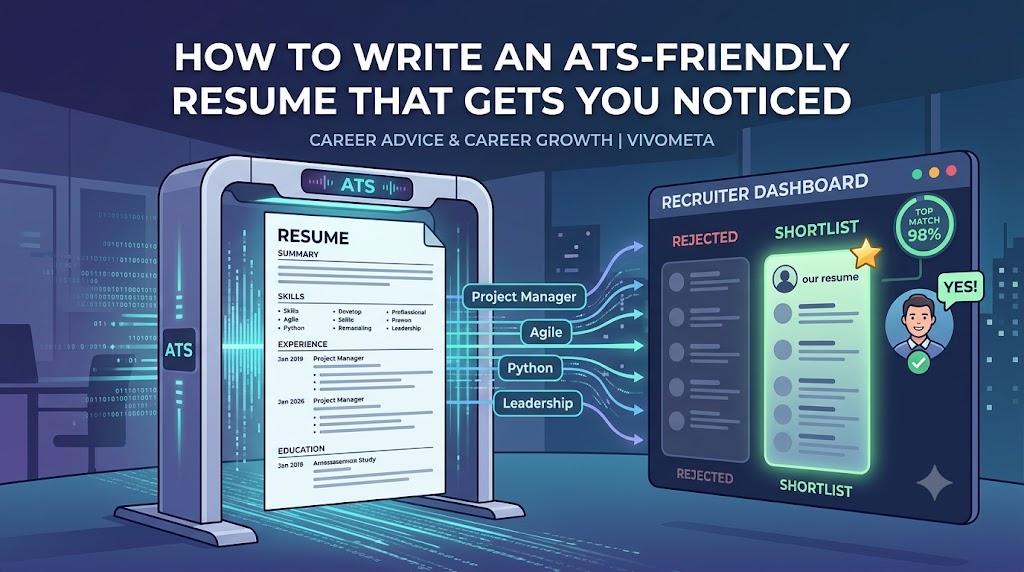
An Applicant Tracking System is software that companies use to manage their recruitment process. When you upload your resume through an online portal, the ATS parses your text, extracts key information (work history, education, skills), and often assigns a match score based on how well your resume aligns with the job description. Only the top-scoring applications are typically forwarded to a recruiter.
This means your resume is both a marketing document for humans and a data file for machines. If the ATS cannot read your resume properly or does not find the keywords it expects, you may get rejected in seconds, regardless of your qualifications.
Common ATS Myths Debunked
Before we get into the how-to, let's clear up some misconceptions that can derail your efforts.
Myth: You need to stuff your resume with keywords until it reads like a robot wrote it.
Truth: While keywords matter, keyword stuffing makes your resume difficult for humans to read and can be flagged by modern ATS algorithms. Use keywords naturally.
Myth: Fancy graphics and charts will help you stand out.
Truth: Most ATS software cannot interpret images, icons, or text boxes. Those design elements often cause parsing errors.
Myth: A PDF is always the safest file format.
Truth: Some older ATS struggle with PDFs. If no format is specified, a .docx file is generally the safest option.
The Core Principles of an ATS-Friendly Resume
Crafting an ATS-friendly resume boils down to four non-negotiable practices. Apply these, and you'll avoid the most common pitfalls.
1. Stick to a Simple, Clean Format
This is the single most important rule. ATS software reads your resume from top to bottom and left to right. Avoid multiple columns, tables, text boxes, headers and footers containing important information, and graphics.
- Use a single-column layout.
- Choose standard fonts such as Arial, Calibri, or Georgia.
- Keep font sizes between 10–12 points.
- Maintain clear spacing between sections.
2. Use Standard Section Headings
ATS software expects familiar labels. Use headings like:
- Professional Summary
- Work Experience
- Education
- Skills
- Certifications
Avoid creative alternatives like "Where I've Made an Impact" or "My Learning Journey."
3. Incorporate Relevant Keywords Naturally
Your target job description is your keyword guide. Look for repeated skills, qualifications, certifications, and technologies.
If the posting mentions phrases such as Project Management, Agile Methodology, or Stakeholder Communication, include those exact terms naturally within your experience bullet points whenever they genuinely reflect your background.
4. Choose the Right File Type
Unless a company specifically requests a PDF, submit your resume as a .docx document.
Vivometa's Resume Builder allows you to download both DOCX and PDF formats.
Step-by-Step Guide to Optimizing Your Resume for ATS
Step 1: Analyze the Job Description
Highlight every required skill, certification, software, and repeated phrase. Pay particular attention to the Requirements and Responsibilities sections.
Step 2: Map Your Skills to the Keywords
Create a simple two-column table.
| Job Keyword | Your Matching Experience |
|---|---|
| Project Management | Managed multiple client projects simultaneously. |
| CRM | Worked daily with Salesforce. |
| SEO | Improved website rankings through SEO optimization. |
Never add skills you don't actually possess. Instead, emphasize closely related experience.
Step 3: Build a Master Resume
Maintain one comprehensive resume containing every role, project, achievement, and skill. Before each application, duplicate it and tailor the content using the relevant keywords.
Step 4: Test Your Resume
Copy your resume into a plain text editor like Notepad. If the content appears in the correct order without formatting issues, your ATS compatibility is likely strong.
Case Study: How Sarah Doubled Her Interviews
Sarah, a marketing manager with eight years of experience, submitted over 40 applications and received only two interview invitations.
After reviewing her resume, she discovered several ATS issues:
- Two-column layout
- Graphics and icons
- Non-standard headings
- Missing industry keywords
She rebuilt her resume using a clean single-column layout, standardized section headings, and incorporated relevant keywords like Demand Generation, Marketing Automation, and Cross-Functional Leadership.
Within one month she applied for only 15 positions and received 7 interview invitations, increasing her callback rate from approximately 5% to nearly 47%.
Quick ATS Resume Checklist
- Use a single-column layout.
- Avoid tables, graphics, sidebars, and text boxes where possible.
- Use standard section headings.
- Match keywords from the job description naturally.
- Spell out acronyms at least once (e.g., Search Engine Optimization (SEO)).
- Don't place important information inside headers or footers.
- Submit as DOCX unless PDF is requested.
- Proofread carefully for spelling errors.
How Vivometa's Resume Builder Simplifies the Process
While you can optimize your resume manually, Vivometa's Resume Builder makes the process significantly faster and easier.
The platform provides:
- ATS-friendly templates
- Single-column layouts
- Standard section headings
- Keyword suggestions
- Multiple resume versions
- DOCX and PDF downloads
- Plain-text compatibility testing
Instead of worrying about formatting, you can focus on telling your professional story.
Conclusion
Your resume must satisfy two audiences: ATS software and hiring managers. Fortunately, the same principles that help software parse your resume also make it easier for recruiters to read.
Start by analyzing a job description, matching keywords to your experience, using a clean layout, and testing your resume in plain text. These simple improvements can dramatically increase your interview rate.
Ready to improve your chances? Build your next ATS-friendly resume with Vivometa and let your qualifications reach the people who matter.
The Vivometa Editorial Team